Quickstart
Get MicroClaw running in a few minutes.
1. Prerequisites
- Rust 1.70+ (2021 edition)
- at least one channel entry point:
- Telegram
channels.telegram.accounts, or - Discord
channels.discord.accounts, or - Slack
channels.slack.accounts, or - Feishu/Lark
channels.feishu.accounts, or - IRC server + nick + channel list, or
- local Web UI mode (
web_enabled: true)
- Telegram
- LLM API key (Anthropic/OpenAI/OpenRouter/DeepSeek/etc.)
openai-codexsupports OAuth (codex login) orapi_key(for OpenAI-compatible proxy endpoints)
2. Install
One-line installer (recommended)
curl -fsSL https://microclaw.ai/install.sh | bash
This installer only installs prebuilt GitHub release binaries.
Homebrew (macOS)
brew tap microclaw/tap
brew install microclaw
From source
git clone https://github.com/microclaw/microclaw.git
cd microclaw
cargo build --release
cp target/release/microclaw /usr/local/bin/
For Matrix channel support, build with --features full.
3. Configure (recommended)
Use the interactive setup wizard:
microclaw setup
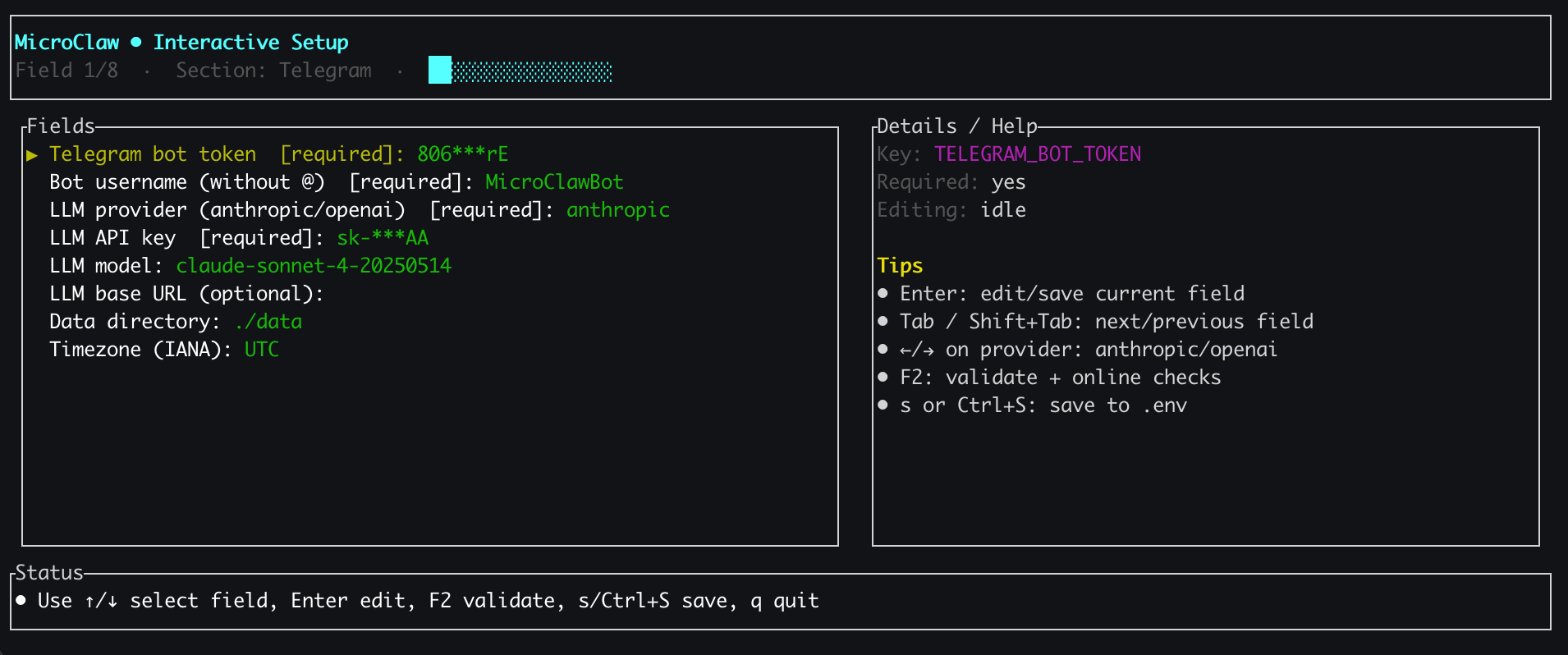
It validates required fields, tests chat/LLM connectivity, and writes microclaw.config.yaml with backup in microclaw.config.backups/ (latest 50 kept).
By default, channel credentials are written in multi-account shape (channels.<channel>.default_account + channels.<channel>.accounts.main).
For multi-bot operations, setup and Web Settings both support editing full channels.<channel>.accounts JSON.
Per-bot soul_path can be configured in both setup and Web Settings by selecting a file from discovered souls/*.md or entering a custom filename/path.
It also includes provider/model list pickers (Enter open list, ↑/↓ move, Enter confirm, Esc close).
Built-in provider profiles:
openai,openai-codex,openrouter,anthropic,ollama,google,alibabaaliyun-bailian,nvidiaqwen-codedeepseek,moonshot,mistral,azure,bedrockzhipu,minimax,cohere,tencentxai,huggingface,togethercustom(manual provider/model/base URL)
For ollama, llm_base_url defaults to http://127.0.0.1:11434/v1, api_key is optional, and the config flow attempts to detect local models.
For openai-codex, you can run codex login first (OAuth from ~/.codex/auth.json or $CODEX_HOME/auth.json), or use api_key with an OpenAI-compatible proxy endpoint.
For aliyun-bailian, the setup flow fills https://coding.dashscope.aliyuncs.com/v1 by default.
For nvidia, the setup flow fills https://integrate.api.nvidia.com/v1 by default and links to https://build.nvidia.com/models.
These are also the valid values for llm_provider in microclaw.config.yaml.
You can define reusable provider_presets profiles, then point channels.<name>.provider_preset or channels.<name>.accounts.<id>.provider_preset at them. The global llm_provider + api_key + model still acts as the main profile.
Manual microclaw.config.yaml configuration is also supported:
llm_provider: "anthropic"
api_key: "sk-ant-..."
model: "claude-sonnet-4-5-20250929"
data_dir: "~/.microclaw"
working_dir: "~/.microclaw/working_dir"
override_timezone: "Asia/Shanghai" # optional; default uses system timezone when unset
working_dir_isolation: "chat" # optional; defaults to "chat"
max_document_size_mb: 100

# Pick one or more channels:
channels:
  telegram:
    default_account: "main"
    # optional channel-level provider profile override
    # provider_preset: "ops-openrouter"
    # optional: route Telegram topics as isolated chats ("<chat_id>:<thread_id>")
    # topic_routing:
    #   enabled: true
    accounts:
      main:
        bot_token: "123456:ABC-DEF1234..."
        bot_username: "my_bot"
      support:
        bot_token: "987654:XYZ-DEF9999..."
        bot_username: "support_bot"
        # optional per-account provider profile override
        # provider_preset: "deepseek-ops"
        # optional per-account topic routing override
        # topic_routing:
        #   enabled: false
# Telegram group chat note for multi-bot:
#   In BotFather for each bot, enable Allow Groups and disable Group Privacy.
# Other channels:
# channels:
#   discord:
#     accounts:
#       main: { bot_token: "DISCORD_TOKEN_MAIN" }
#   slack:
#     accounts:
#       main: { bot_token: "xoxb-main...", app_token: "xapp-main..." }
#   feishu:
#     accounts:
#       main: { app_id: "cli_xxx", app_secret: "xxx", topic_mode: true } # topic_mode only for feishu/lark domains
# Optional reusable provider profiles:
# provider_presets:
#   ops-openrouter:
#     provider: "openrouter"
#     api_key: "sk-or-..."
#     default_model: "openai/gpt-4o-mini"
#   deepseek-ops:
#     provider: "deepseek"
#     api_key: "sk-ds-..."
#     default_model: "deepseek-chat"
# channels:
#   irc:
#     server: "irc.example.com"
#     nick: "microclaw"
#     channels: "#general"
web_enabled: true
Optional: run bash tool in container sandbox
Default behavior is host execution (sandbox.mode: "off").
To enable sandbox quickly:
microclaw setup --enable-sandbox
microclaw doctor sandbox
Or set it manually to route bash tool calls into sandbox containers:
sandbox:
  mode: "all"
  backend: "auto" # auto|docker|podman
  security_profile: "hardened" # optional; hardened|standard|privileged (default hardened)
  # cap_add: ["SETUID", "SETGID", "CHOWN"]
  image: "ubuntu:25.10"
  container_prefix: "microclaw-sandbox"
  no_network: true
  require_runtime: true
  # optional external allowlist file (one allowed root per line)
  # mount_allowlist_path: "~/.microclaw/sandbox-mount-allowlist.txt"
Runtime backend behavior:
backend: "auto"uses Docker only (keeps existing behavior).backend: "docker"requires Docker runtime.backend: "podman"requires Podman runtime.
Quick verification:
docker info
docker run --rm ubuntu:25.10 echo ok
For Podman backend verification:
podman info
podman run --rm ubuntu:25.10 echo ok
Optional hardening:
~/.microclaw/sandbox-mount-allowlist.txt: sandbox mount allowlist.~/.microclaw/sandbox-path-allowlist.txt: file tool path allowlist.sandbox.security_profile: "hardened"is the default restrictive mode; use"standard"if sandboxed commands need default container capabilities.
Then start MicroClaw and ask it to run:
cat /etc/os-releasepwd
4. Preflight diagnostics (recommended)
microclaw doctor
Sandbox-only diagnostics:
microclaw doctor sandbox
For support tickets, attach JSON output:
microclaw doctor --json
Text output includes clear status markers:
[✅ PASS] ...
[⚠️ WARN] ...
[❌ FAIL] ...
5. Run
microclaw start
That is it. On first launch, if required config is missing, start will auto-open the config flow.
After setup, the runtime initializes SQLite, starts scheduler, and boots configured adapters (Telegram/Discord/Slack/Feishu/IRC/Web).
If web_enabled: true (default), local Web UI is available at:
http://127.0.0.1:10961
If you want to expose MicroClaw to another local tool over stdio instead of a chat channel, you can run:
microclaw acp
6. Optional: run as persistent gateway service
microclaw gateway install
microclaw gateway install --force
microclaw gateway status
microclaw gateway status --json --deep
Lifecycle commands:
microclaw gateway start
microclaw gateway stop
microclaw gateway restart
microclaw gateway logs 200
microclaw gateway uninstall
Next
- Read Configuration to see all config keys
- Explore Tools to understand what the agent can do
- Review Usage Examples for common workflows